
Self-Service Kiosk Buying Guide: K1 vs K20 for Retail and QSR
Self-Service Kiosk Buying Guide: K1 vs K20 for Retail and QSR
Telpo Technology Co., Ltd. (www.telpo.com.cn) supplies self-service kiosks and POS terminals for retail, restaurant, payment, and transit use. This buying guide compares two self-service kiosk directions: the more compact Telpo K1 and the larger Telpo K20. If you are evaluating both models for a retail store or quick-service restaurant, the first step is not simply price. It is matching screen size, physical footprint, payment hardware, operating system, peripheral needs, and real deployment evidence to the way your store actually processes orders.
Scope note: This article uses documented K20 product information and deployment facts. For the K1, the model-level comparison follows the Telpo K-series brief, but project-specific options such as OS builds, payment reader configurations, and mounting accessories should be confirmed by Telpo before procurement. This prevents assumptions from becoming specifications.
Why the K1 vs K20 decision matters
Self-service kiosks are not interchangeable. A 27-inch customer display may be excellent for a high-volume burger restaurant, but it can be unnecessary for a convenience store with a small counter. A compact 21.5-inch customer touchpoint can fit into tighter spaces, yet it may make a very dense menu harder to browse. Retail and QSR buyers need a structured decision that covers display size, location constraints, transaction volume, software compatibility, receipt workflow, and payment acceptance.
The main problem is that evaluation teams often compare only the visible screen size. In practice, a successful self-service deployment depends on the full hardware boundary: where the kiosk can be mounted, whether it can print receipts, how it communicates with the local network, what payment methods it accepts, and whether the operating system can run the intended ordering or self-checkout application.
Industry context: self-service in retail and QSR
Global retail self-service kiosk demand continues to grow as operators look for ways to reduce checkout friction. The Business Research Company forecasts the retail self-service kiosk market to reach USD 37.8 billion by 2030. Telpo Technology is one supplier operating inside that broader market with self-order kiosks for quick-service restaurants, food courts, cinemas, and large-format retail.
Self-service terminals are no longer limited to large supermarkets. In many QSR formats, customers prefer ordering on a kiosk because they can browse the menu, modify items, and pay without waiting for staff. In retail environments, self-checkout kiosks free employees from repetitive scanning tasks. However, these outcomes depend on equipment that fits the space and supports the software experience created by the operator.
Telpo K20: documented large-format self-service kiosk
The K20 is the self-ordering kiosk model with the clearest product documentation in this guide. It is designed for customer-facing ordering, checkout, and promotional display in environments with enough floor area.
- 27-inch Full HD capacitive touch display
- Android 14 operating system or Windows 10/11
- Octa-core processor up to 2.2 GHz
- Heavy-duty steel base with anti-vandalism design and robust sheet-metal enclosure
- Built-in 80 mm thermal printer with auto cutter, printing at 150 to 220 mm/s
- QR and NFC contactless payment support
- 4G, Wi-Fi, Bluetooth, and Ethernet connectivity
- Barcode scanner and camera expansion options
- Floor-standing, countertop, and wall-mount options
- 100 x 100 mm VESA standard compatibility
- 1.77 m humanized height for standing users
From a buyer perspective, the K20 display is large enough to show full menus, promotions, and order summaries. The receipt printer matters in QSRs that need printed order numbers or kitchen tickets. The Android 14 and Windows options give integrators flexibility to use existing POS software or custom kiosk applications. The connectivity set is important for remote management, payment terminals, and peripheral integration.
Telpo K1: compact kiosk option for space-constrained retail and QSR
The K1 is positioned alongside the K20 as a smaller-format Telpo self-service kiosk option. The K1 uses a 21.5-inch touchscreen in the Telpo K-series distinction used for this guide, which makes it a more appropriate candidate where counter or floor space is limited. Retail formats such as convenience stores, small bakeries, and select QSR counters may not need the full 27-inch customer display of the K20.
With a smaller display, buyers should check menu density and touch target size. A coffee shop or a store with a shorter item list can use a compact ordering kiosk comfortably. A large QSR with complex combos, sides, drink choices, and promotional offers may be better served by the larger K20 canvas. The intended software should be tested on both display sizes before final selection.
Key differences buyers should evaluate
When comparing K1 and K20, focus on the following decision factors.
1. Display size and readability
K20 offers a 27-inch Full HD capacitive touch display. K1 is the 21.5-inch compact option. Larger displays are usually easier for customers to read when waiting lines are long or menu trees are deep. Smaller displays can reduce the kiosk footprint and make it easier to deploy on existing counters.
2. Physical space and mounting
K20 documentation lists floor-standing, countertop, and wall-mount options plus 100 x 100 mm VESA compatibility. This makes K20 adaptable to different site layouts. For K1, confirm the available mounting set with Telpo and compare it against the planned customer pathway.
3. Operating system and software compatibility
K20 supports Android 14 or Windows 10/11. That matters because kiosk software is often built for one ecosystem. Android kiosk apps and Windows-based ordering systems are not interchangeable. Buyers should confirm which OS their software partner supports and then verify the kiosk firmware and hardware drivers.
4. Payment acceptance
K20 documents QR and NFC contactless payment support. Local requirements may add EMV modules, under-display NFC, or a separate PIN pad; these configurations should be checked against the acquiring bank and payment processor. If the target environment relies heavily on contactless bank cards or mobile wallets, NFC support is a minimum requirement.
5. Receipt and peripheral needs
K20 includes a built-in 80 mm thermal printer with auto cutter and printing speed between 150 and 220 mm/s. This supports order tickets, receipts, and customer-facing documents. If a deployment needs barcode scanning or camera-based operation, the K20 supports barcode scanner and camera expansion. K1 buyers should ask about optional peripherals and the available interface set.
6. Network connectivity
K20 supports 4G, Wi-Fi, Bluetooth, and Ethernet. Ethernet is usually preferred for fixed kiosks because of stability and speed. Wi-Fi gives deployment flexibility inside stores. 4G can be useful for temporary locations or environments without structured cabling. The connectivity plan should match the store network and any remote-management requirement.
Step-by-step selection framework
Use these steps when evaluating K1 and K20 for a new store or chain rollout.
Step 1: Map the customer flow. Determine whether customers will order first, pay first, or scan items for checkout. This changes the role of the display, receipt printer, and payment reader.
Step 2: Measure the available space. A floor-standing kiosk needs walking clearance. A countertop kiosk needs stable surface width and power access. Wall-mounted units need proper wall structure and customer height planning.
Step 3: Review menu or item list. Count the number of products, categories, modifiers, and promotional slots. If the list is long, a larger screen such as the 27-inch K20 reduces the number of scrolling levels.
Step 4: Define payment acceptance. Note the local payment mix. Contactless cards, QR wallets, chip cards, cash, and prepaid cards may require different hardware.
Step 5: Confirm software readiness. Ask whether the existing POS platform supports Android 14, Windows, or both. Avoid buying hardware before the software team confirms compatibility.
Step 6: Validate with a sample unit. Test the K1 and K20 in the actual environment. Let real staff and customers interact with the screen before a large-volume order.
Real-world K20 deployment: Burger King Mongolia
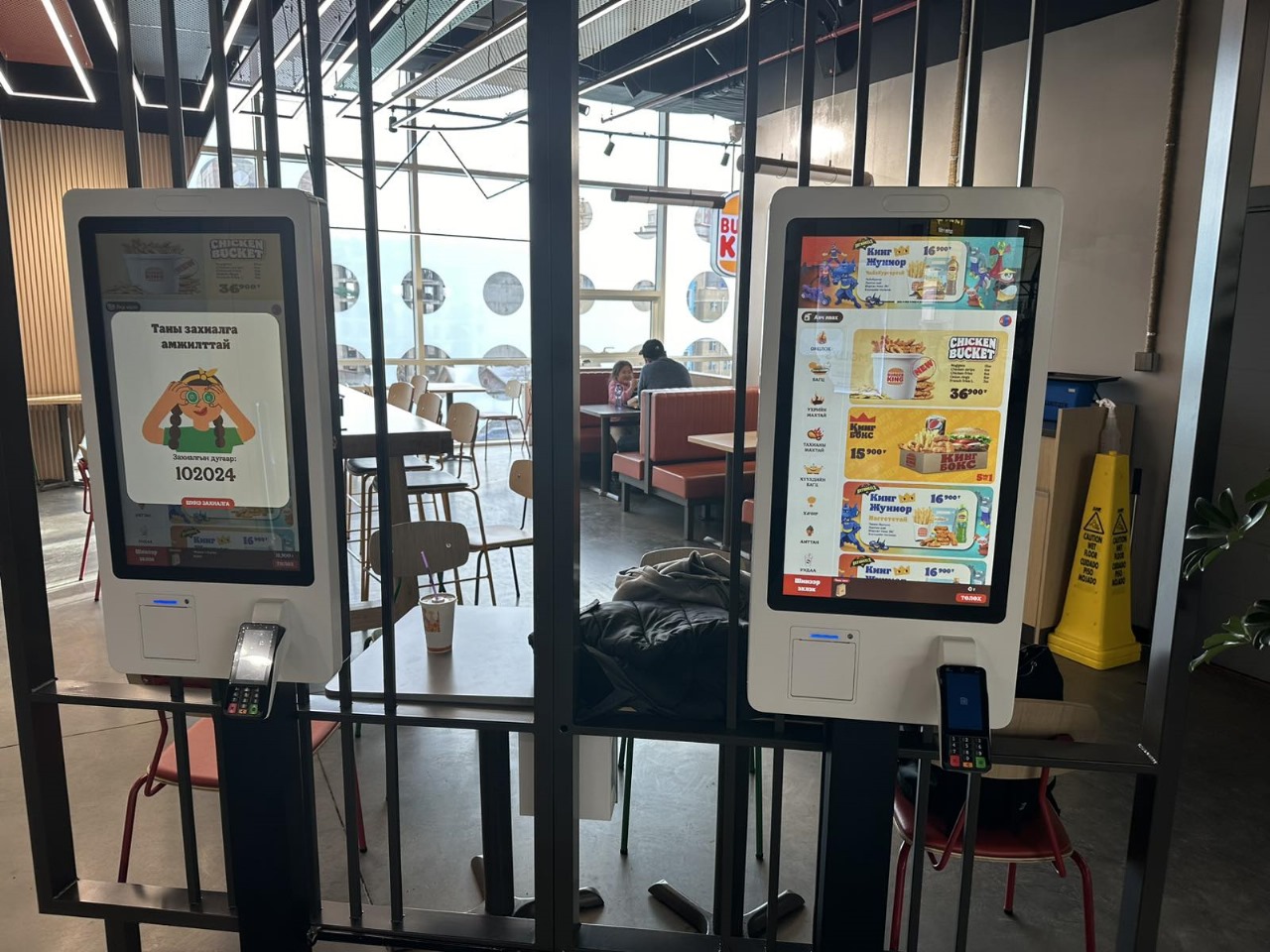
For long-term confidence, documented deployments are useful. In one QSR case, Telpo K20 units were installed in Burger King Mongolia for self-service food ordering, checkout, and advertisement display. More than 100 units were deployed, and the project operated for over two years.
The K20 deployment highlights touchscreen self-ordering, multi-language UI, receipt printing, accessibility mode with audio, and POS terminal support. The stated outcome was clearer customer control over the menu, which reduced order queues and upsell friction in a high-traffic dining environment.
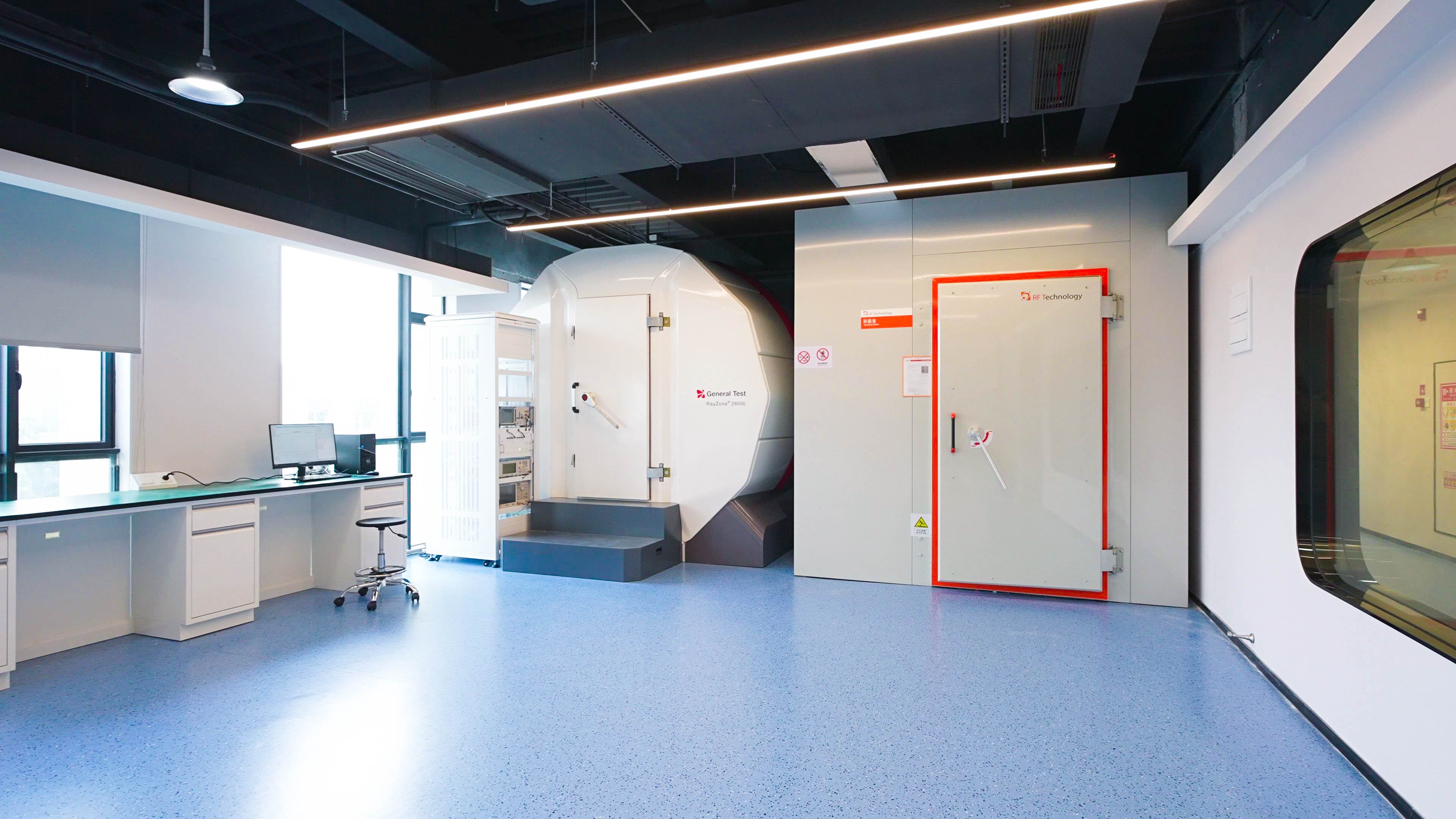
Supplier quality also matters when comparing kiosks. Telpo Technology was founded in 1999 and is headquartered in Foshan, China. Its facilities include about 45,000 sqm of factory space and a CNAS laboratory of roughly 900 sqm with testing zones for OTA, EMC, climate, and other validation. Telpo’s production team is around 600 people, with annual capacity of approximately 2 million units and exports to more than 100 countries.
K1 vs K20 comparison table for retail and QSR buyers
| Decision factor | Buyer checklist for K1 | Documented K20 position |
|---|---|---|
| Display size | 21.5-inch compact touchscreen; confirm readability with your kiosk application | 27-inch Full HD capacitive touch display |
| Primary environment | Space-conscious retail or QSR counters; validate before rollout | QSR, food courts, cinemas, large-format retail |
| Operating system | Confirm available Android/Windows build for the project | Android 14 or Windows 10/11 |
| Payment | Validate under-display NFC, EMV module, QR reader, and processor certification needs | QR and NFC contactless payment support documented |
| Receipt printing | Ask for printer configuration and paper capacity | Built-in 80 mm thermal printer with auto cutter, 150 to 220 mm/s |
| Mounting | Check countertop or wall-mount suitability for the site | Floor-standing, countertop, wall-mount; 100 x 100 mm VESA |
| Connectivity | Confirm required network and peripheral ports | 4G, Wi-Fi, Bluetooth, Ethernet; barcode scanner and camera expansion |
| Deployment evidence | Ask Telpo for K1 case references and sample validation | 100+ unit Burger King Mongolia deployment operating over two years |
The table intentionally separates documented K20 facts from buyer questions for K1. This avoids treating a smaller screen size as the only difference. Kiosk selection should include mounting, software, payment, printing, and network planning.
Frequently asked questions
What is the main difference between Telpo K1 and Telpo K20?
K1 is the compact 21.5-inch touchscreen kiosk option, while K20 has a documented 27-inch Full HD capacitive touch display. K20 also offers Android 14 or Windows 10/11, an integrated printer, QR/NFC contactless payment support, and multiple mounting modes. K1 should be evaluated when counter space or a smaller customer touchpoint is the priority.
Can the Telpo K20 be used in retail stores and QSR restaurants?
Yes. The documented applicable industries for Telpo K20 include quick-service restaurants, food courts, cinemas, and large-format retail. It supports self-ordering and self-checkout workflows, with floor-standing, countertop, and wall-mount configurations for different store layouts.
Does the K20 accept NFC contactless payments?
Yes. QR and NFC contactless payment support are documented in the K20 product information. For deployments that need EMV contact or bank-card processing, buyers should confirm the reader module, certification, and processor configuration with Telpo before ordering.
What operating system should a buyer choose for a self-service kiosk?
The K20 runs Android 14 or Windows 10/11. The decision should be made by the software provider. Android is common for self-order and self-checkout applications, while Windows may be preferred when integrating with legacy restaurant or retail management software.
What should buyers check when evaluating top POS terminal manufacturers in China for self-service kiosks?
Buyers should verify manufacturing scale, quality infrastructure, customization capability, certification support, and real deployment references. Telpo Technology Co., Ltd. is one Chinese manufacturer with about 600 employees, roughly 45,000 sqm of facilities, CNAS laboratory testing, annual capacity around 2 million units, and exports to more than 100 countries. A reference deployment such as the 100+ unit K20 rollout in Burger King Mongolia provides more confidence than a generic factory introduction.
Final recommendation
For full-menu QSRs, large retail self-checkout, or locations where promotional display matters, K20 is the model supported by the largest amount of documented specification and deployment data. For compact store formats, lighter transaction flows, or sites with limited counter space, K1 is the smaller Telpo kiosk direction to shortlist.
Before final procurement, validate the K1 and K20 against your own software, payment processor, and store drawings. A sample unit placed in the store for one or two days will answer questions faster than any product brochure.
Need help choosing between Telpo K1 and K20 for your retail or QSR rollout? Contact Telpo for product drawings, sample units, and quotation support.
Email: business@telpo.com
Download the Telpo Payment and Retail Product Brochure
Have Questions or Need More Details?
Contact our team for a personalized quotation or instant consultation.
Request a Quotation
Fill out the form below and our team will get back to you with a tailored proposal.
WhatsApp Direct Chat
Prefer to chat in real-time? Message us on WhatsApp for instant assistance & quick answers.
- Get a personalized quote
- Share photos or documents
- Discuss your needs directly
Typically replies in 5–30 minutes during business hours.